Calculating arrival date




How Do Laser Printers Work: The Laser Printing Process
12/23/2025

Quick answer
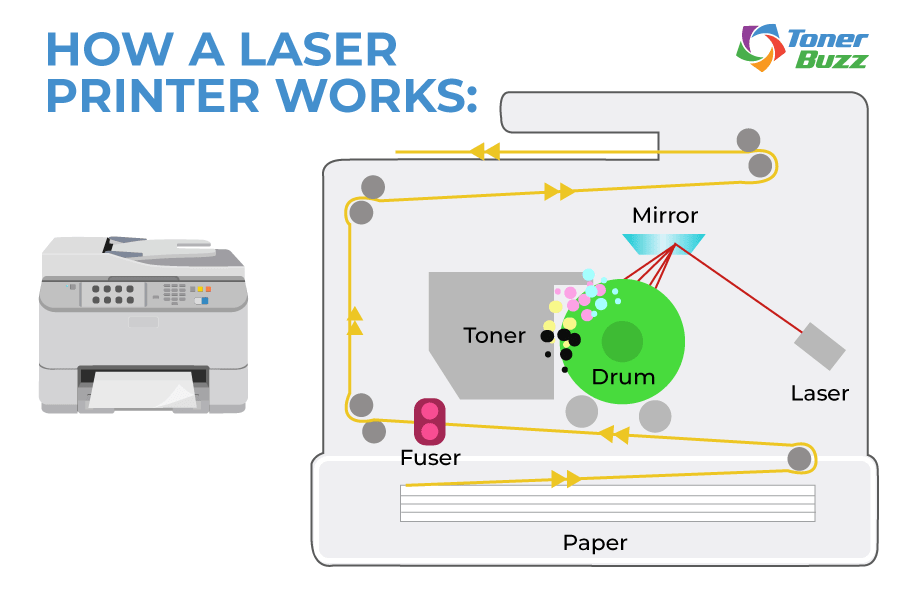
Laser printers use an electrical charge to attract toner particles to a transfer roller. Toner particles are pressed onto a piece of paper, while heat and pressure from the fuser unit permanently fix the image onto the page.
The Seven Steps of Laser Printing
Laser printing combines data, static electricity, light, and heat. It happens in seconds, but each stage inside the printer is carefully controlled.
Here’s the full process, explained step by step.
Step 1: Sending
The process begins when a document is sent from a computer to the printer. The file is converted into digital data that the printer understands.
Inside the printer, this data is processed and reassembled into a printable image. This step determines exactly where the toner will be placed on the page.
Step 2: Cleaning
Laser printers leave a residue on the printer drum. Cleaning is a physical and electrical process carried out in order to remove the previous print job and prepare the photosensitive drum for the new print job.
During the cleaning process, remnants of toner on the drum are scraped away by a rubber-cleaning blade into a debris cavity. Electrical charges remaining on the drum from the prior print job are defused by electrostatic erase lamps inside laser printers.
This reset prevents ghosting, streaks, and other artifacts on the next page.
Step 3: Conditioning
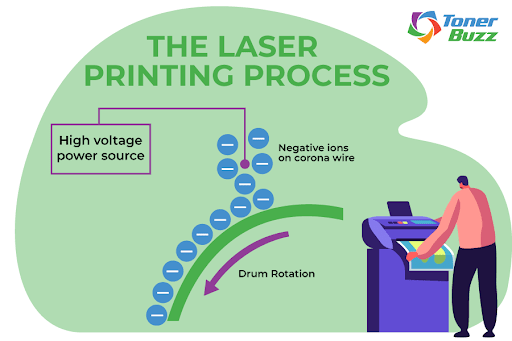
Next, the printer prepares the drum and the paper with carefully controlled electrical charges.
The primary charge roller spins against the organic photoconductor (OPC) drum and gives the drum surface an even negative charge. Think of this as a clean, charged “canvas” that is ready for the laser to write on.
The paper also receives a controlled charge as it moves into position. This setup matters later, because the paper needs the right charge to pull toner away from the drum during the transfer stage.
This step is the foundation of laser printing. If the drum charge is uneven, toner will land in the wrong places. The result can look faded, patchy, or inconsistent.
Step 4: Exposing
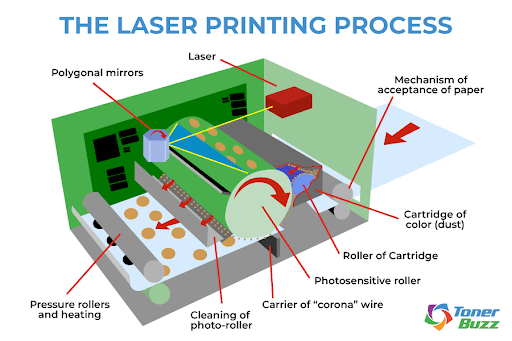
Laser time! The next step is exposing. Here, the photosensitive drum is exposed to a laser beam. Every area of the drum exposed to the laser has its surface charge reduced.
An invisible latent print is generated as the printer’s drum turns. The image that will ultimately be printed exists for the first time as a thin pattern of electrical charge on the OPC drum.
The darkness within the printer cartridge is broken by the glow of the laser. The beam bounces off a spinning, multi-sided mirror and breaks into countless rays of information, changing the charge on the drum surface in precise areas.
Line-by-line, the laser speaks to the revolving surface of the drum unit, describing a page with the language of charged toner particles. This part is black, this part is yellow, and this part...yes, this part...is wonderfully magenta. The drum wears a positively charged image on its surface, ready to transfer onto the paper.
Step 5: Developing
In the developing stage, toner is applied to the latent image on the drum. Toner consists of negatively charged powdered plastic mixed with pigments for black, cyan, magenta, and yellow printing.
Toner is typically 85–95% finely ground plastic. Other ingredients include colored pigments, fumed silica, and charge control agents.
Silica helps prevent toner particles from clumping and allows smooth flow through the cartridge. Charge control agents help the toner maintain a stable negative electrical charge so it responds accurately to the charged image on the drum.
A control blade regulates how much toner coats the developer roller, ensuring a thin and even layer.
A variety of pigments are used to create color toner cartridges:
- Yellow: Pigment Yellow 180 (Benzimidazolone)
- Magenta: Pigment Red 122 (2,9-Dimethyl-Quinacridone)
- Cyan: Pigment Blue 15:3 (Copper Phthalocyanine)
- Black: Carbon black combined with powdered plastic
Step 6: Transferring
Next comes transferring. A transfer roller (or secondary corona wire) applies a strong positive charge to the paper as it moves through the printer.
When the paper passes beneath the drum, the positive charge pulls the negatively charged toner particles off the drum and onto the paper. This attraction is electrostatic, not magnetic, and it happens with precise timing and control.
The toner image lifts cleanly from the drum and settles onto the paper in the exact pattern created by the laser. Small amounts of cyan, magenta, yellow, and black toner combine to form full-color images and sharp text.
In some color laser printers, the paper passes each color station in sequence. In others, all colors transfer in a single pass. In both designs, the result is the same: the full toner image now rests on the paper, ready for fusing.
Step 7: Fusing
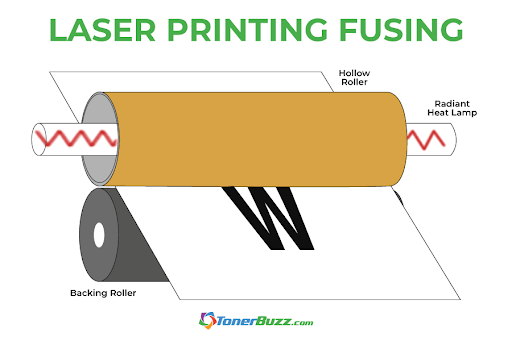
The final phase is fusing. Heat and pressure fix the toner permanently to the paper as it passes through the fuser unit. The toner melts and bonds with the paper fibers, creating a durable image.
Fuser rollers often use non-stick coatings such as Teflon. In some printer designs, a small amount of silicone oil helps prevent toner from sticking to the rollers as the paper passes through.
Once the page exits the fuser, printing is complete. Any toner that did not transfer to the paper remains on the drum and is removed during the next cleaning cycle, while the printer resets itself for the next print job.
You Might Be Wondering: What Is The History of Laser Printers?
The rise of laser printer technology has its roots in the dot-matrix printers and mimeograph machines of the 1950s and ‘60s.
Who invented the laser printer?
Well, IBM pioneered the dot-matrix printer in 1957, and Xerox released its first photocopier two years later.
Laser printers are similar to photocopiers. Photocopiers used a “dry” printing technology called xerography (also known as electrophotography), which uses electrical charges to attract toner particles onto paper.
In 1967, a Xerox engineer named Gary Keith Starkweather came up with the idea of photocopiers producing images sent directly from a computer. Although his supervisors at Xerox frowned on the idea, Starkweather pursued the concept.
Starkweather modified a copier, replacing the imaging unit with a laser beam and an eight-sided rotating mirror. The laser created a charged image, toner attached to it, and heat fused it to the page.
Xerox debuted the first commercial laser printer for the business office, the Xerox 9700, in 1977. HP began marketing inkjet printers for the home office that same year, though they didn’t gain popularity until the mid-’80s.
Are Laser Printers Better Than Inkjet?
Not necessarily. If you’re printing thousands of pages and high volume, you should seriously consider a laser printer. It will lower your overall cost per page.
While laser printers were once much more costly than inkjet printers, advances in technology have narrowed that price gap. Check the data; there’s no need to tighten your belt in order to afford a laser printer. They cost about the same as ink-based printers now.
Inkjets are good for glossy photo prints, or a home office that doesn’t print at high volume. They’re even good for printing your own business cards! As expected, an inkjet printer uses ink, and replacement ink is expensive!
Sure, new OEM toner cartridges aren’t cheap either, but the page yields are much higher than you’ll get from an ink cartridge.
In general, you can print hundreds of pages per inkjet cartridge but thousands of pages per toner cartridge.
❓ Frequently Asked Questions
Do Laser Printers Use Ink?
No. Laser printers use toner, which is a dry powder rather than liquid ink.
What Is Toner Made Of?
Toner is primarily plastic resin mixed with pigments and small additives that help the powder flow and hold an electrical charge.
How Long Does a Toner Cartridge Last?
Toner has a long shelf life. If you store a toner cartridge properly in a cool, dry place and keep it away from direct sunlight and extreme temperatures, it can stay usable for several years.
How Do I Choose the Right Toner for My Laser Printer?
Always check your printer model and cartridge number before purchasing toner. Look for cartridges that provide consistent print quality, reliable page yield, and clear compatibility information.
At Toner Buzz, we focus on original toner cartridges and make selection easy with clear printer-model matching and detailed cartridge information.