Calculating arrival date




The Ultimate Brother Toner Guide (2026)
Posted by Rob Errera on 08/21/2025
Brother is one of the top printer manufacturers, and Brother laser printers are designed to work best with genuine Brother toner cartridges. Every model of Brother laser printer has a specific toner cartridge designed to work with that printer.
Below, we'll dive into the world of Brother toners and explain everything you ever wanted to learn about it.
Brother Laser Printer Types
Brother’s laser printers fall into two main categories: monochrome (black-and-white) and color. Knowing which type you own is the first step in choosing the right toner.
- Monochrome laser printers use a single black toner cartridge, such as the TN-660 or TN-730. They’re popular for homes and offices that mostly print text, because they’re efficient and cost-effective.
- Color laser printers require four separate cartridges — black, cyan, magenta, and yellow — like those in the TN-223 or TN-227 series. This setup allows you to replace only the color that runs out, but it also means more consumables to manage.
Every Brother printer model is built to work with a specific set of toner cartridges and drum units. To avoid mistakes, always check your printer’s model number and confirm which cartridges are compatible before ordering replacements.
Brother Toner Cartridges
Brother printers use different cartridges depending on the model. Inkjet and label printers rely on ink or ribbon, while laser printers use toner cartridges that work with a separate drum unit.
Toner vs. Drum: What’s the Difference
Brother laser printers use two separate components: the toner cartridge and the drum unit.
This is different from some other brands, such as HP, where the toner and drum are combined into a single unit. Brother’s design helps reduce waste and cost, but it can also be confusing if you are not familiar with it.
Let’s clear that up.
Toner is the printing material itself. It is a fine, dry powder that fuses to paper with heat and pressure. Each Brother toner cartridge contains enough powder to print thousands of pages, depending on the cartridge type and printer model.
The drum unit is a separate part of the printer. It is a rotating, photosensitive cylinder that transfers the toner onto the paper. Every time you print, the drum collects toner from the cartridge and presses it onto the page in the form of text or images.
Since the drum does not hold toner, it usually lasts much longer than the cartridge. A toner cartridge might need replacing after a few thousand pages, while a drum unit can often last anywhere from 12,000 to 50,000 pages, depending on the model.
In short, toner is consumed with every print job, while the drum is a reusable component with a much longer lifespan.
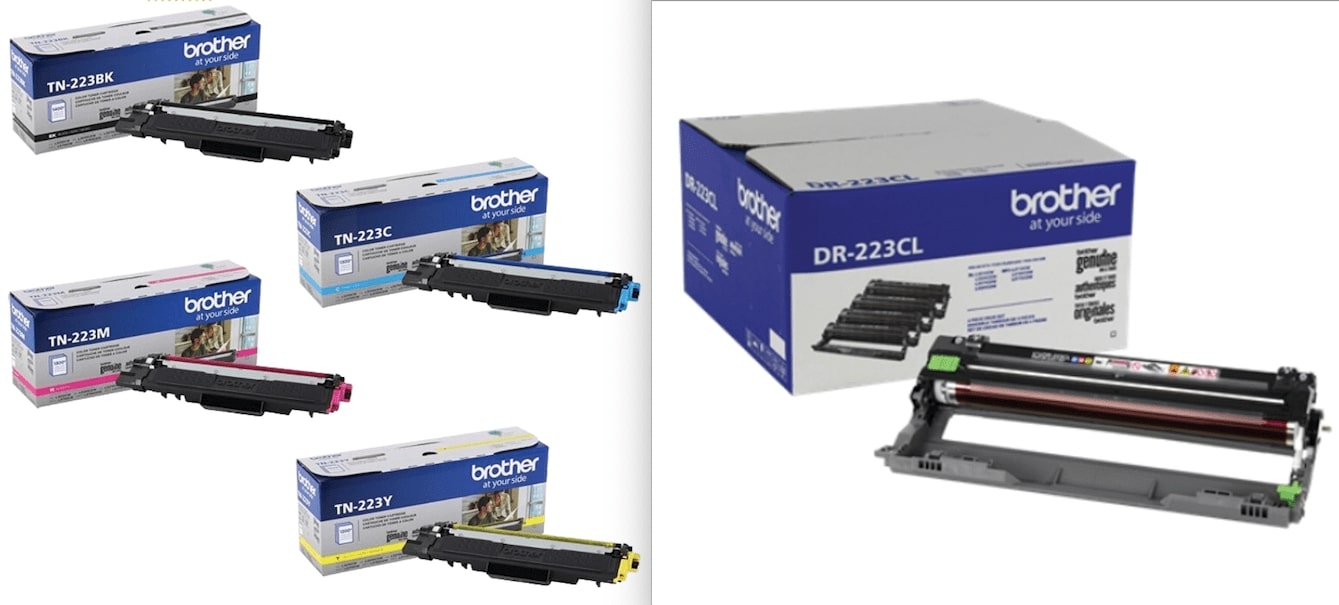
The image below shows a set of TN-223 color toner cartridges (left) alongside the matching DR-223 drum units (right), used in models like the HL-L3270 and MFC-L3750 series.
Standard vs. High-Yield vs. Super High-Yield Cartridges
| Yield Type | Page Yield | Pros | Cons |
|---|---|---|---|
| Standard Yield | 1,200 to 3,000 pages | Lower upfront cost | Higher cost per page, more frequent replacements |
| High-Yield | Up to 3,000 | Lower cost per page, fewer replacements | Slightly higher initial cost |
| Super High-Yield | 4,500 or more | Best value per page, fewer cartridge changes | Higher upfront cost, not available for all models |
When you buy a toner cartridge, one of the first things you’ll notice is the page yield listed on the box. Page yield refers to the estimated number of pages a cartridge can print before it runs out.
Brother toner cartridges come in standard, high-yield, and super high-yield options:
Standard Yield
Standard-yield cartridges are the entry-level option. Most print around 1,200 pages, though some series, like the TN-820, can reach up to 3,000 pages.
They cost less upfront, which makes them a good fit for home users or offices that only print occasionally. The trade-off is more frequent replacements and a higher cost per page.
High-Yield
High-yield cartridges sit in the middle ground. Depending on the series, they can print anywhere from 2,600 pages up to 8,000 pages. They’re more expensive than standard versions, but they last longer and bring down the cost per page.
For most small offices or households that print regularly, high-yield is the best balance of value and convenience.
Super High-Yield
Super high-yield cartridges are designed for heavy-duty printing. Some deliver around 4,500 pages, while others stretch as far as 12,000 pages.
These are the most expensive to buy, but they give the lowest cost per page and require the fewest replacements. They’re the smart choice for schools, busy offices, and enterprises where printing is nonstop.
Take Brother’s 800-series as an example. This family makes it clear how moving from standard to high-yield to super high-yield affects both page yield and cost per page.
| Toner Cartridge | Price | Page Yield | Cost per Page |
|---|---|---|---|
| Brother TN-820 | $81 | 3,000 pages | $0,03 |
| Brother TN-850 | $129 | 8,000 pages | $0,02 |
| Brother TN-880 | $139 | 12,000 pages | $0,01 |
Even though the TN-850 and TN-880 cost more upfront than the TN-820, they deliver many more pages and cut the cost of each page in half or more.
If you’d like to check this with other cartridges, the math is simple: just divide the cartridge price by its page yield. Or you can use the Cost per Page Calculator at Toner Buzz to do it instantly.
Dual-pack Brother Toner Cartridges
There are also dual-pack Brother toner deals available for purchase, like this TN336-2PK dual pack, for instance.
Dual-pack Brother toner cartridges are a good option for someone who prints frequently and doesn’t want to run out of toner in the middle of a job.
Having a spare toner cartridge on hand can get you out of a jam, especially if you work after hours. Where are you going to get a fresh toner cartridge at 3 AM?
Work smarter, not harder -- always have a backup toner cartridge available for your printer.
In addition, dual-pack Brother toner cartridges can save you money. Dual packs are generally priced cheaper than the cost of two single cartridges, so you get more for your money -- plus peace of mind while printing -- when you buy a dual-pack of genuine Brother toner cartridges.
Brother Toner Cartridge Naming
All genuine Brother toner cartridges begin with the letters “TN”, which simply stand for toner. After this prefix comes a three-digit number, and that number places the cartridge into a specific family.
The number varies depending on which Brother printer model the cartridge is designed for but increases according to page yield.
For example:
- Brother TN-720; standard yield = 3,000 pages
- Brother TN-750; high yield = 8,000 pages
- Brother TN-780; super high yield = 12,000 pages
Compare this to the page yield of another batch of toners from the Brother 700 series.
- Brother TN-730; standard yield = 1,200 pages
- Brother TN-760; high yield = 3,000 pages
- Brother TN-770; super high yield = 4,500 pages
It's important to note that Brother toners may have similar names, but this does not necessarily mean they are connected or interchangeable.
For example, the TN-720, 760, and 780 cartridges and bigger and flatter, while the TN-730, 760, and 770 cartridges are chunky, lopsided rectangles. These cartridges are designed to work with different models of Brother laser printers.
The same goes for Brother’s 600 and 800 toners. The formula of toner inside these cartridges may be the same, but the cartridges are physically different and are intended for different models of printers.
This is why Brother’s naming can feel confusing. Cartridges may share similar numbers, but unless they are part of the same family, they will not fit the same printer. Always check your printer’s manual or model number before buying replacement toner.
Genuine vs. Non-Original Brother Toner
When choosing toner, it is also important to consider whether you are buying genuine Brother cartridges or third-party alternatives. Brother printers are designed and tested to work best with original Brother toner.
Non-original cartridges, sometimes sold as compatible or remanufactured, are usually less expensive, but quality can vary widely. Some work without issues, while others may produce streaks, show incorrect toner levels, or even damage the printer.
For consistent print quality and reliability, we recommend sticking with genuine Brother toner. If you need replacements, you can buy genuine Brother toner cartridges for different needs directly from Toner Buzz.
At Toner Buzz, we offer only original Brother toner to match your printer and printing demands.
How Do I Know I’m Using Genuine Brother Toner?
There are three methods of Brother toner authentication.
Method 1: Download the i-nigma Reader app and scan the QR code on your package to ensure your Brother supplies are genuine.
Method 2: Locate the Brother security hologram on your printer cartridge and enter the Brother toner serial number search on the online Brother Authentication Tool.
Method 3: Shifting the package will change the visual perception of the hologram. A genuine Brother security hologram will feature dots, numbers, and multi-angle text.
Brother Toner Troubleshooting
Over time, every toner cartridge will eventually run low and need attention. Brother printers are designed to give you warnings, like “Toner Low” or “Replace Toner,” before the cartridge is completely empty.
Sometimes you can squeeze out a few extra pages by resetting the warning message, but eventually the cartridge will need to be replaced with a new one.
How To Check The Toner Level on Brother Laser Printers
You can perform a Brother toner level check in several ways.
On Windows
- Double-click the printer icon in the task tray to open the Brother Status Monitor Utility.
- Your ink and toner levels will be displayed.
On macOS
- Click on your HD icon
- Go to Library > Printers > Brother
- Double-click on Brother Status Monitor Utility
- Check your ink and toner levels
On the Printer Itself
- Press the Ink/Ink Management key on the printer’s LCD panel.
- Scroll to find the ink volume option.
For some older Brother printers, you can press the OK button three times to print your printer settings. The second page will list the percentage of toner remaining.
When toner is very low, your printer will display a “Replace Toner” message. If this appears, you won’t be able to print settings, but you can still view toner levels using the control panel:
- Press OK. The display will show Machine Info. Press OK again.
- Select Parts Life.
- Select Toner Life.
- If using a color printer, choose the toner color you want to check, then press OK.
- The LCD will display remaining toner levels on a scale of 0–10, where 10 is full and 0 is empty.
Resetting Error Messages and Extending Toner Life
When the toner is low on a Brother laser printer, you will get a “replace toner” message. This is how you will know when to replace the Brother toner.
This can be frustrating if it happens in the middle of a print job. But we know a “secret key sequence” that can override the “replace toner” message or “Brother toner not detached” message and allow you to get a little more life out of that “empty” toner cartridge.
When the “replace toner” message appears, do the following:
For Brother MFC Series
- Open the front panel.
- Press Clear.
- When prompted to replace the drum, press 1 2.
- The display will read Accepted then Cover is Open.
- Close the panel and resume printing.
For Brother DCP Series
- Open the front panel.
- Press Clear.
- When prompted to replace the drum, press Start.
- Use the Up Arrow to select 12 on the display.
- Press OK.
- The display will read Accepted, then Cover is Open.
- Close the panel and resume printing.
For Brother HL Series
- Power off the printer and open the front panel.
- Hold the Go button and power the printer back on.
- Release Go once the LEDs stop flashing.
- Press Go twice (Toner, Drum, and Error LEDs will light).
- Press Go seven times.
- When the Error LED flashes, close the panel and resume printing.
These tricks don’t replace a new cartridge, but they can buy you enough time to finish your current print job.
How To Replace a Genuine Brother Toner Cartridge
If you purchase a new Brother laser printer, it will likely come with starter cartridges that have a lower page yield compared to standard cartridges.
Even if you use a super high-yield toner cartridge, brother, it will eventually need to be replaced.
But don’t worry; replacing genuine Brother laser printer cartridges is easy!
Toner! Brother! Printer! Let’s do it!
- Turn on the printer
- Open the front cover
- Release the green lock lever
- Remove the old toner cartridge and drum unit assembly from the printer
- Press the green clips on the drum unit to release the empty toner cartridge
- Unpack the new Brother toner cartridge
- Insert the new toner cartridge into the drum unit until it clicks into place
- Slide the green tab of the corona wire left and right several times, then return it to the home position
- Align the arrow on the cartridge with the arrow on the drum. Insert the drum unit with the toner attached into the printer
- Close the front cover of the machine
- Do not turn off the machine or open the front cover until the machine returns to Ready Mode
For in-depth information and step-by-step illustrated instructions on replacing Brother toners, please refer to our dedicated article available here.
Next up: time to recycle your old Brother cartridges. Printers and Planet Earth will thank you!
Recycling Genuine Brother Toner Cartridges
It's easy to recycle toner for Brother printers. Simply return your empty cartridges with Brother's free return system.
Print a free shipping label using Brother's Smart Label system and return your empty Brother laser cartridges in the package your new Brother laser printer toner cartridge came in.
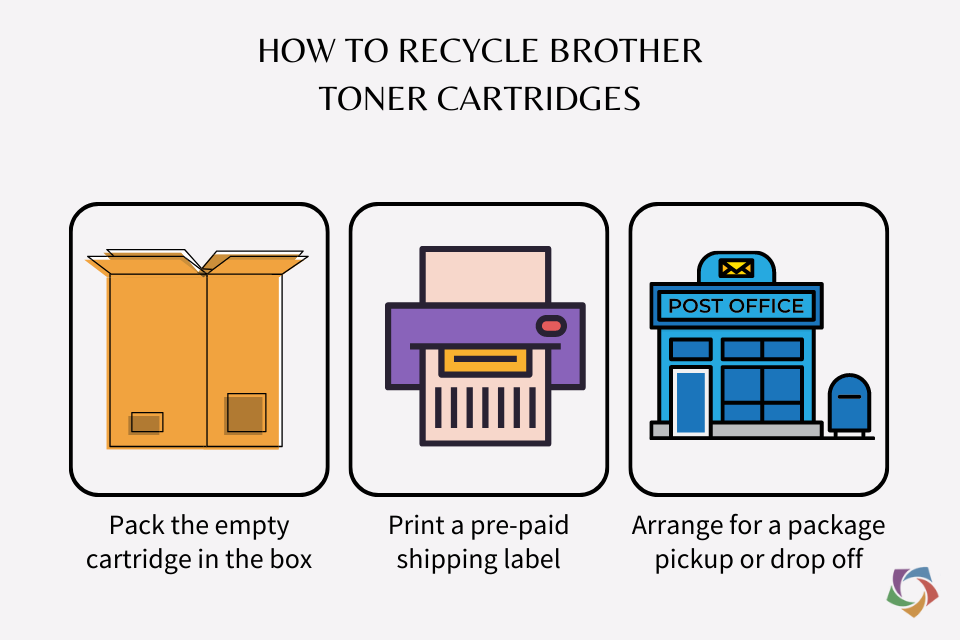
Follow these three steps and mail your Brother toners for recycling.
To recycle your Brother ink or toner cartridges (including P-touch cartridges):
- Pack the empty cartridge in the box that the new cartridges came in.
- Print a pre-paid shipping label through Brother's Smart Label system.
- Arrange for a package pickup or drop off at any United States Post Office.
❓ Frequently Asked Questions
What is the difference between Brother 600 series, 700 series, and 800 series toners?
We don’t know for sure, but the toner formula probably varies for each series of Brother cartridges. If any “Brother insider” has a better understanding of Brother’s naming conventions for its toner cartridges, please let us know.
How do I recycle my Brother ink and toner cartridges?
Print a free shipping label through Brother's Smart Label system and return your empty cartridges in the package your new cartridge came in.
How long should a Brother laser printer cartridge last?
Depending on how often you print, you can get years of use from a genuine Brother toner cartridge.
How long do Brother toner cartridges last?
Unlike ink, toner is dry powder sealed in an airtight container. As long as your toner cartridge isn’t damaged, the toner inside should last for years.
Does Brother toner expire?
No, but you should still store your toner properly to extend the life of your Brother toner.
What should I do if my Brother toner is light on my printouts?
It might be time for a fresh toner cartridge. But before you do that, remove the current toner cartridge, shake it back and forth a few times, and install it back in the printer. This should loosen any clumps of toner inside the cartridge. Also, you may want to check that your paper thickness settings are correct.
What should I do if Brother toner isn’t sticking to the paper?
Sounds like your fuser is going. The fuser heats up and melts the toner particles while the transfer roller presses the melted toner onto the page.
Make sure the paper setting on your computer matches the one on your printer. Some printers allow you to adjust the temperature of the fuser. If you have a printer like that, crank the heat up on your fuser. If not, it may be time to replace your fuser.
Learn more about common toner problems here.
What should I do if my Brother toner is leaking?
Again, it might be time for a fresh toner cartridge. A genuine Brother toner cartridge should not leak unless it has been dropped and the casing is cracked.
Either way, you can clean up any toner spills inside your printer with a clean, dry, lint-free cloth. Be careful, but if you make a mess, here’s how to get toner out of clothes and carpets.
Can you use generic toner in a Brother printer?
Generic toner cartridges print poorly and can even damage your printer. Read about the differences between genuine OEM, compatible, and remanufactured toner cartridges.
Are Brother toner cartridges refillable?
We don’t recommend trying to refill a Brother laser toner cartridge. Skip refilling ink cartridges, too. It’s a messy waste of time and money!
Toner for the Brother laser printer is formulated for your specific printer model. That’s why you should only use genuine Brother toners in your Brother laser printer.
What are the most popular Brother toner cartridges?
Some of the most popular Brother toners are:
Why buy Brother toners from Toner Buzz?
- Original Brother Quality Products
- Toner Buzz is a leading online supplier of OEM Brother laser printer cartridges and ink, so you are guaranteed the best quality, long-lasting print results from all our Brother toner products
- Save Money on your Brother printer toner cartridges
- When buying Brother printer toner from Toner Buzz, you will benefit from savings of up to 40% off the prices at other big box office supply stores.
- Top Customer Service
Along with helping customers save money, Toner Buzz takes great pride in providing an exceptional shopping experience and outstanding service, consistently earning 5-Star Google Ratings.

Rob Errera
Rob Errera is an award-winning journalist embedded in the world of printers and printing supplies. Rob has nearly two decades of experience writing about cutting edge technology, business trends, and the ever-evolving industry of printing.