Calculating arrival date





 Black
Black Black
BlackPrinter Fit Guarantee

Yes, we guarantee it will work!
The TonerBuzz Printer Fit Guarantee ensures that the toner you buy will work with your printer. All you have to do is select your printer from the dropdown above, and we'll let you know if this is the right toner for you.
Not sure how to find your printer model number?
Give us a call at 1-800-203-8411 and
we'll help
you find the right toner.
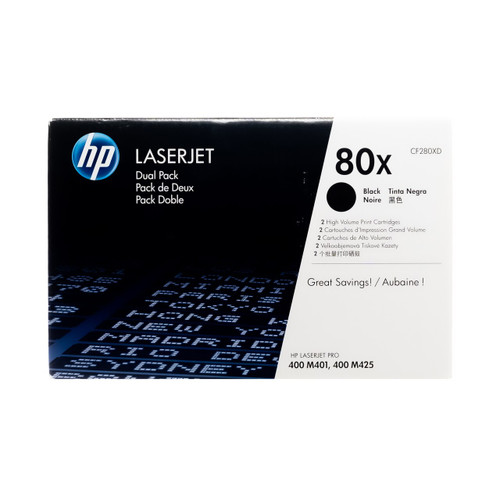
HP 80X (CF280XD) 2-Pack | Original HP Dual Pack Black Toner Guaranteed to Work With These Printers:
Specifications
-
Brand:HP
-
SKU:CF280XD
-
UPC:886112379643
-
MPN:CF280XD
-
Product Type:Toner Cartridge
-
Color:Black
-
Page Yield:6,900 pages (per cartridge)
-
Pack Type:2-Pack
-
Alternate SKU:HEWCF280XD
-
Page Yield Type:High-Yield
Description
The HP 80X (CF280XD) High Yield Dual Pack Toner Cartridges are built for offices that print often and need consistent, professional-quality results. Each original HP cartridge produces crisp black text and clean, sharp graphics for reports, forms, and presentations that need to look polished every time.
This dual pack includes two high-yield cartridges designed to keep your printer running longer between replacements. Each cartridge delivers thousands of pages with uniform toner coverage and reliable performance, helping reduce downtime and supply management effort. The consistent output helps maintain document quality across large print jobs without fading or streaking.
Installation is simple, and every page prints with dependable clarity from start to finish. When you order from TonerBuzz, you get fast delivery, genuine HP products, and reliable service that supports your workflow. The HP 80X Dual Pack is a practical choice for businesses focused on productivity, long-term value, and steady print performance.
Does this toner print in color?
No. This is a black toner cartridge designed for monochrome printing only.
Is this a genuine HP product?
Yes! We only sell original, brand name toner cartridges at Toner Buzz!
Do toner cartridges expire or dry up?
No. HP toner cartridges contain dry powder and will not dry out like ink. As long as they’re stored properly in their original sealed packaging, they’ll be ready when you are.
How do I replace the old toner cartridge?
• Open the printer’s front/top cover
• Remove the used toner cartridge by its handle
• Unpack the new cartridge and gently shake it side-to-side to distribute the toner evenly
• Align it with the mounting slots and slide it into place until it clicks
• Close the cover and run a test print